- Katy Patrick
- Knowledge Base
The Change Headings – Query Set tool allows you to add and / or remove Subject headings from a set of titles all at once. You can create this set either using the Query tool or from a list of titles; for example, if another library shares their list of “Amish Romances” or “Cozy Fantasy” with you, or when using the spreadsheet of RUB Project volunteer ratings.
Process overview
- Enter or Import a Query Set. This set should be under 4,000 titles maximum.
- Open Change Headings – Query Set and review the loaded Search Results.
- On the Add/Remove Headings tab, add a line for each of the change for this batch of titles.
- Use the Apply Headings Changes button; the listed change(s) will be made for all titles.
Download
Last updated May 2026.
Please log in to download content. Thank you!Resources
For more information about applying the Rated Unrated Books (RUB) volunteer ratings, see:
For ready-to-import query sets of the recent Talking Book Topics titles and / or Sequel titles, see:
How do you use Change Headings by Query Set? Share your tips in the comments--or let us know if you have questions!
- Katy Patrick
- Knowledge Base
Thank you everyone for joining us for a wonderful 2026 KLAS Users' MiniConference! The recordings from our State of Keystone and KLAS New Features sessions are now available, and the slides from the un-recorded APH Integration Roadmap session are available as well.
State of Keystone
State of Keystone
What has Keystone as a company been up to in the last year?
Slides & Session Chat
Session Recording
KLAS New Features - LBPD
KLAS New Features - LBPD
Learn more details and ask questions about new LBPD-focused features added to KLAS since our last conference.
Minor correction: the user activity tracking and inactivity log-out period are being implemented on the KLAS side, so this new security feature will be available for all libraries at release, even if that library is not yet using a web-based log in.
Slides & Session Chat
Session Recording
Referenced Articles:
KLAS New Features - IRC
KLAS New Features - IRC
Learn more details and ask questions about new IRC/IMC-focused features added to KLAS since our last conference.
Slides & Session Chat
Session Recording
Referenced Articles:
APH Integration Roadmap
American Printing House for the Blind (APH) Integration Roadmap
Learn more details of the integration with the APH Ordering System and catalog: where it stands now, what features are planned, roadblocks and opportunities. This is your opportunity to weigh in on priorities and provide feedback on planned features!
Slides & Session Chat
Session Recording
- Not available due to technical difficulties, with our apologies.
- Katy Patrick
- Knowledge Base
Thank you everyone for joining us for a wonderful 2026 KLAS Users' MiniConference! The recordings from NLS and User-presented sessions are now available.
KLAS Users' Group Business Meeting
KLAS Users' Group Business Meeting
Presenter: Josh Easter, President, KLAS Users' Group
Description: KLAS Users’ Group Business Meeting including committee reports, VP election information, future conference discussion, etc.
Session Recording
NLS Updates
National Library Service for the Blind & Print Disabled Updates
Presenters: Jason Yasner, Shah Shafaat, Sarah Garske, and David Perrotta, National Library Service for the Blind & Print Disabled
Description: Updates from NLS Staff
Slides & Session Chat
Session Recording
Patron Services and Retention Roundtable
Patron Services and Retention Through Impactful Practices in KLAS Roundtable
Presenters: J.D. Burns, Mississippi Talking Book Services & Josh Easter, South Dakota Braille & Talking Book Library
Description: How can we use KLAS to create stronger relationships with our patrons, and how do these relationships correlate into patron retention? Can we measure the effect of how initiating contact with the patron affects the lifespan of patron usage of the service, and retention of that patron? The overall goal will be to discuss how building relationships with our patrons can help us better serve them, and essentially retain them, and what tools are available in KLAS to do so.
Slides & Session Chat
- Burns, J - Services and Retention Roundtable slides (Google slides)
- 2026-05-12 Patron Retention chat (txt)
Session Recording
Loading BARD Circ Stats Panel Discussion
Loading BARD Circulation Stats Panel Discussion
Presenter: James Gleason, Perkins Library
Description: Every month the BARD download records come around. We all have our ways of getting those records into KLAS. Which do you find best? What is your timetable? What about libraries who outsource braille services? These and other topics will be discussed.
Slides & Session Chat
Session Recording
Excel Analysis for KLAS Reports
Excel Analysis for KLAS Reports
Presenter: Jason Richmond, Library of North Carolina’s Accessible Books and Library Services
Description: KLAS reports generate useful numbers and snapshots. With Excel you can transform those numbers into maps, charts, and graphs to visualize your data over time and geography. If you ever wanted to know the distribution of your patrons by county or to find trends in your circulation, this is the program for you!
Slides & Session Chat
Session Recording
- Andrea Ewing Callicutt
- Knowledge Base
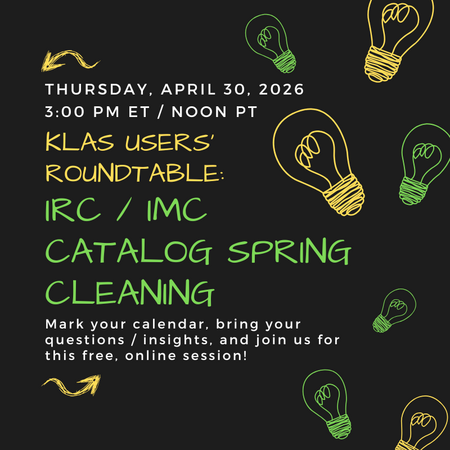
What's on your Spring Cleaning to-do list? Pepper Watson, Oklahoma Accessible Instructional Materials Center, and Marion Campbell, Keystone Systems shared Catalog clean-up items ideal for the months ahead, such as taking inventory, updating WebOrder, and withdrawing Discontinued items such as EBAE titles.
Hear about it all right here!
Referenced resources:
- Withdraw Inventory (locked to logged-in KLAS Admins only)
- Reconcile Inventory
- Katy Patrick
- Knowledge Base
The Talking Book Topic order forms can be circulated as a local Large Print serial. If you do not yet have the order forms (usually SER-TBF2) in your Serials module, please contact Keystone Customer Support to request it.
Note: This same process can be used for any other local, physical serials as well.
Outline
- Before Receiving a new Issue
- To Receive the new Issue
- To Print Mailing Cards/Labels
Download
Please log in to download content. Thank you!Do you send the TBT Order Form as a Large Print serial? Share your tips in the comments--or let us know if you have questions!
See the Serials Manual for more information about handling all local and NLS-produced serials.
- Andrea Ewing Callicutt
- Knowledge Base
Learn the basics of the Patron module for Libraries for the Blind and Print Disabled (LBPD) staff in this introduction webinar for new users, or those looking to fill in a few gaps in their foundation. Topics include the tabs available for navigating the patron record, adding or updating contact information, how titles are chosen for a patron based on their Profile and Preferences, and the NLS Parental Acknowledgement.
Resources & References
Hands-on Practice Worksheet
This worksheet is designed to be updated to fit your training database by a KLAS Admin or senior RA; just swap out the underlined sections with a patron (or book) that fits the scenario and the answer key.
However, if no one is available to customize the worksheet, it can still be used! Instead of looking at a specific record and filling in the specific answer, reference any example patron and fill in only the "where to find it" lines.
Session Recording
Timestamps of Topics Discussed:
- 2:38 Parts of the Patron Module
- 6:22 Finding a Patron
- 8:31 Tab Overview
- 8:35 Main Tab
- 14:58 Contact Tab
- 20:35 Profile Tab
- 25:20 Blocks Tab
- 27:07 Preferences Tab
- 31:41 Service Queue
- 34:53 Service Flow
- 34:53 Profile to Service Queue to Orders
- 40:13 Select Type / Data Source Descripton
- 41:32 Orders
- 44:10 Items
- 44:52 Filtering
- 48:40 NLS Acknowledgements

- Katy Patrick
- Knowledge Base
The time has come: Talking Book Topics (TBT3 / TBT4) is being handed over to the network libraries for duplication.
Per our previous article on the topic: you have two options for distribution.
- The quickest, easiest, simplest option is to send it with your other NLS serials (usually as the DS medium). If many of your TBT subscribers also get other serials, they can travel on the same cartridge to save you some labor.
- The option that will give you the most control and the best statistics is to give it a unique medium (such as TBT). This option allows you to send the TBT on a different day of the week from your other serials, and ensures that a patron already at cutoff for serials can still get the new TBT so long as they’ve returned the previous one.
Let us know which medium you want to use, and we’ll get the Serial title set up for you. Either way, new issues will load automatically ready-to-duplicate just like all the former MOCs.
The rest of this article discusses options for reviewing and weeding your subscribers list, sending a form letter, handling the TBT Order Form, and available support.
You have options for how to move forward depending on how hands-on you want to be: if you can invest some time and/or send an Opt-In form letter now, it can save you time duplicating TBT issues for patrons that won’t make use of them.
Reviewing your Subscribers
As discussed in the previous article, we recommend reviewing your subscriber list to make sure that you are only duplicating the catalog for patrons that actually want it.
If you only subscribe patrons to TBT on request and are comfortable duplicating TBT for your current active subscriber count, we can copy that subscriber list to the new serial. On the other hand, if you have a high number of subscribers, and if you have previously subscribed people to TBT by default, you might want to send a form letter (discussed below), and / or do some review and weeding of your subscriber list.
But how to go about doing that?
Patrons to Subscribe:
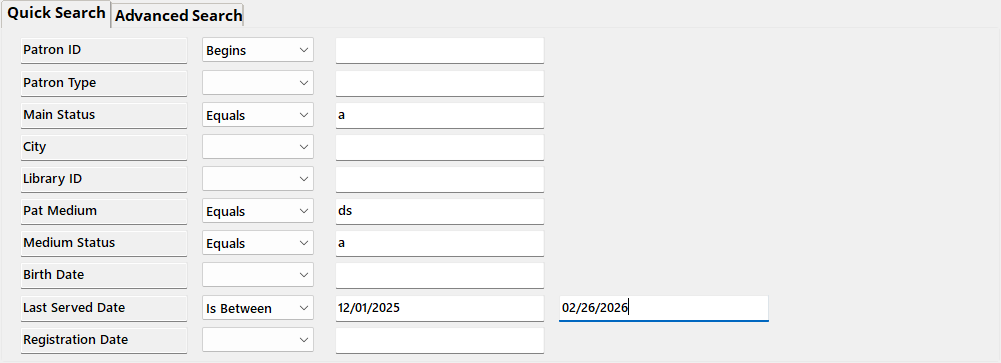
If you are going to send Talking Book Topics as a DS, you can leave anyone already getting other DS serials subscribed to it without any extra work. To find these patrons, Query in the Patron module for:
Quick Search
- Main Status | Equals | A
- Pat Medium | Equals | DS
- Medium Status | Equals | A
- Last Served Date | Is Between | 12/01/2025 | 02/26/2026
[optional parameter to narrow results to patrons that have gotten something in the past three months]
Advanced Search
- Subscription | KLAS ID | Equals | SER-TBT4
[or may be SER-TBT3 in your database] - Subscription | End Date | Is blank

Additional “Patrons to Subscribe” query options:
If your staff adds TBT requests to the Request list instead of directly to the Service Queue, requests can be queried (although the time elapsed since the last TBT makes these more likely to have all gone out by now):
- Media | Pat Medium | Equals | DB
- Media | # Requests | Does not Equal | 0

You could also try Querying for all subscribers with recent DB activity (just sub DB for DS in the first query in this article).
Patrons to Review:
Use Merge Queries to remove the above results from the full subscriber list to see who’s left. Start by running the above query and opening the Query Set by double-clicking any result.
Then query for all active patrons with a subscription to TBT4:
Quick Search
- Main Status | Equals | A
Advanced Search
- Subscription | KLAS ID | Equals | SER-TBT4
[or may be SER-TBT3 in your database] - Subscription | End Date | Is blank
Again, make sure to open the Query Set instead of just exiting the results screen.
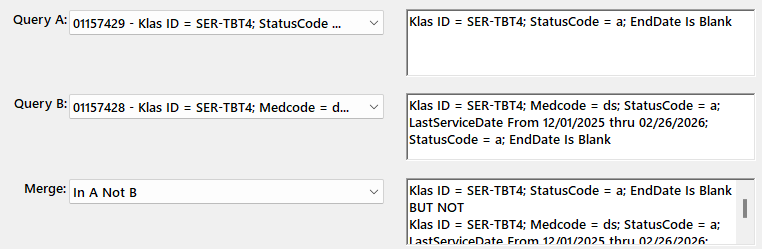
Finally, use the Queries menu to select Merge Queries, and set the following:
- Query A: your most recent Query, with all active subscribers
- Query B: second most recent Query, subscribers that are already active in DS (or one of the other “patrons to subscribe” queries.
- Merge: in A, not B
Export this list to Excel with a high enough Max to include all the Merge results, Visible Fields only, for a list you can divvy between staff and/or make notes on.
Double-click any result in the table below to open the Query Set to print Labels for a form letter, to do another merge to subtract another “patrons to subscribe” query from these results, or to start reviewing results in KLAS.
If this still gets you an overwhelming number of results, feel free to get in touch with Customer support to talk through your options!
What to Check For:
Once you have a list of patrons to review, what are you looking for?
Other than general activity and known patron preference, check for signs that the patron has actively been requesting titles. In addition to the Requests tab, you can look at the Items Tab “Selected By” column for QuickRequest or Web. If a patron has just been getting titles by preference, and particularly if they have been requesting titles via the WebOPAC, do they really need or want a recorded catalog? But if they’ve been getting a lot of titles from Quick Request, they got those numbers somewhere–and TBT is a likely source.
You can also watch for BARD patrons. While just having a subscription to SER-DDB9 doesn’t mean the patron is comfortable using BARD, you can check for downloads on the patron’s Items tab as well. If you use a Serve Type of BARD or OB for your download-only patrons, they can easily be excluded from your subscriber list.
Finally, watch for blocks. If a patron just has a temporary block to hold their books while they are on vacation, that doesn’t need to impact your decision. On the other hand, if they have a block for returned mail and no one has been able to contact the patron for over six months, you probably don’t need to duplicate the TBT for that patron just for it to be returned to sender.
Form Letter
You may wish to send notification to all TBT subscribers, or just those targeted for review, letting them know about the change in distribution and asking if they want to remain subscribed.
Simply making the duplicated version of the TBT strictly Opt-In rather than trying to decide which subscribers to keep may be the best option for some libraries, although it does require a print cost for the mailing itself, and it places the burden on patrons who may not be able to easily read and reply to a letter or postcard.
For sending a letter, you can filter the SER-TBT4 subscribers tab to only show Active patrons, and export to excel with All Fields for a mail merge.
Or you can use either the all Active Subscribers query above or the merged query set with the Patron labels function. While in the Query Set, use the Functions menu to select Labels. Switch the radio button to “Entire Query,” and contact us if you need a new Label Stock set up.
About the Order Form
Do you want to print and mail the order form to your patrons? Or only to patrons that request it?
We can add a new Large Print serial for the TBT Order Form, allowing you to subscribe only the patrons that actively want the order form. The downsides of this approach:
- Timing: the new issue of TBT will show up and start going into orders as soon as NLS distributes the file, even if the order form isn’t posted or printed yet.
- Once the order form is available, you would need to manually add the new Issue as you would for a local serial.
Available Support
We will be getting the serial record added for all KLAS libraries. If you want it as a new Medium, we are happy to do all of that set-up as well.
Once you have the new record, you can start adding the subscribers you know you want to keep. If it’s an extensive list even after the review and curation above, we may be able to help.
There’s no particular need to cancel or remove the subscriptions to the SER- version. As with the big MOC transition, I’d recommend leaving them for now so you have the information available to reference. If you want them cancelled for cleanliness sake later on, we can do so.
Finally, remember that the forums are here to help you all help each other! If you create a form letter (or recorded announcement), have other ideas of criteria to check for (either for the “to subscribe” column or the “don’t subscribe” column), or have other strategies and ideas for serving your patrons better for this transition–please share in the comments below!
- Andrea Ewing Callicutt
- Knowledge Base
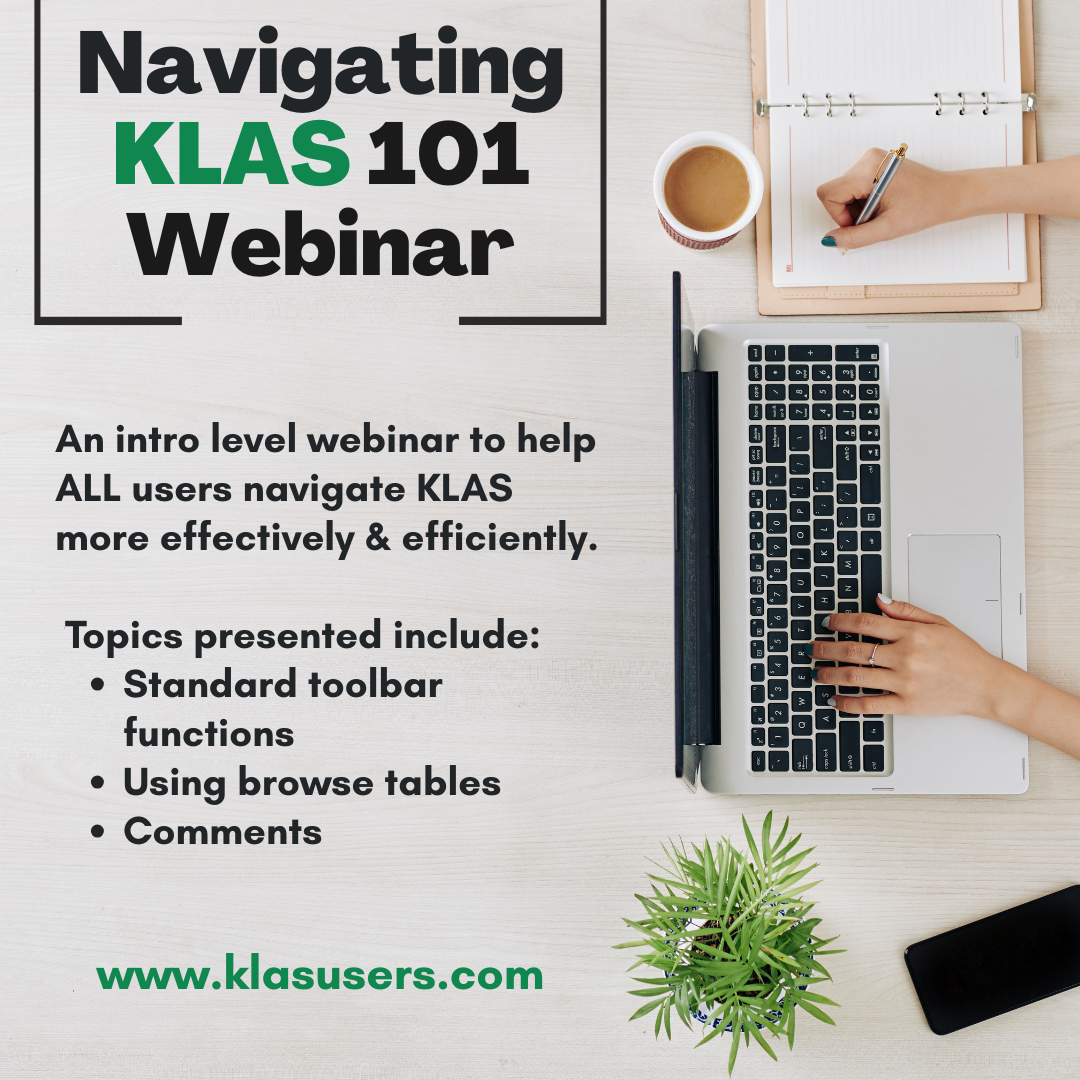
Learn the basics of KLAS in this introduction webinar for new users, or those looking to fill in a few gaps in their foundation. Topics include standard toolbar functions, using browse tables, and comments. These fundamentals are useful throughout KLAS, for both Library for the Blind and Print Disabled (LBPD) and Instructional Resource / Materials Center (IRC/IMC) users.
Resources & References
Hands-on Practice Worksheet
Session Recording
Timestamps of Topics Discussed:
- 2:30 Logging into the KLAS Training Database
- 6:38 KLAS Header Info
- 7:29 Using Find
- 9:56 "Begins" Searching
- 11:09 Searching for a phone number
- 13:10 Recent list
- 13:28 Comments function
- 14:47 Browse Tables
- 16:53 Sorting columns in a browse table
- 17:59 Filtering a browse table
- 19:00 Moving columns in a browse table
- 20:00 Saving browse table column positions
- 21:20 Exporting data to Excel from a browse table
- 25:12 Resetting browse table column positions
- 27:40 Transaction Buttons (Add, Update, Delete, Reset, Cancel)
- 39:22 The Functions Menu
- 43:50 Example function: How to erase Has-Hads
- 50:35 About KLASusers.com
- Katy Patrick
- Knowledge Base
The PIMMS error report is sent nightly to alert you to any errors returned by the PIMMS sync. These errors prevent any changes to the record from syncing, so they must be addressed to allow the patron or machine information to be updated. Errors remain in the report until they are corrected and the patron can successfully sync with PIMMS.
If an error is not listed below, or if the included recommended action / things-to-check do not clear the error, please contact Customer Support with the full row information from the report, including the Patron or Machine ID and the full error text.
Note that one line may include multiple errors. For example: “MaintainPatron - Edit Failed
First name must be a minimum of 1 and a maximum of 255 characters
Last name must be a minimum of 1 and a maximum of 255 characters
Individual patrons must have a 4 digit birth year (YYYY), or a full birth date (YYYY-MM-DD)”
If you need to change who at your library receives this vital report, contact Customer Support at
| Error Text | What it Means and How to Fix It |
| MaintainMachine - Edit Failed MaintainMachine - Cannot edit a machine that doesn't belong to your custodian. Current custodian ([name] [library]) |
This usually occurs when the patron and machine previously transferred out of your library and the machine has the status NAC/TFR. Change the item status to NAC/TFA to indicate that the machine is no longer at your library. |
| MaintainAddress - Delete Failed Cannot delete final address |
Set a Contact Preference for a valid shipping address. |
| MaintainEmail - Add Failed A valid email must be supplied |
Check the email format to make sure there is a valid email (with one @ and a .suffix) in the value field. Non-email text (such as a name, “N/A” or “none”) should not be included. |
| MaintainMachine - Edit Failed Machine Status - Not Found |
This usually means the machine has a Cir Status of NAC or WDR and nothing set for the Mat Disposition. PIMMS needs to know why it is NAC. Change the item status. |
| MaintainPatron - Add Failed Institution name must be a minimum of 1 and a maximum of 255 characters |
Confirm that the Individual checkbox on the main tab is set appropriately. Ensure that the Last Name field on the Main tab includes the name of the Institution. |
| MaintainPatron - Edit Failed Invalid legal acknowledgement email Invalid legal acknowledgement phone |
Ensure that the Alt Contact with the Legal subtype has a valid email and/or phone number. |
| MaintainPatron - Edit Failed Invalid legal acknowledgement name Invalid legal acknowledgement title Invalid |
Ensure that the Alt Contact with the Legal subtype has a job title in the Description field and a first and last name in the Name field. The name can be entered as Firstname Lastname or as Lastname, Firstname Middle. |
| MaintainPatron - Edit Failed Parent/Guardian info is required when answer is Yes or No |
Ensure that an Alt Contact record is present with the subtype of Parent or Guardian. The contact’s full name should be included, with their phone number and email. If multiple such records are listed, set a ParentalAck Contact Preference for the one that should be synced to PIMMS. |
| MaintainPatron - Edit Failed Patron ID must be a minimum of 1 and a maximum of 12 characters |
Ensure that the patron has an ID in the Barcode field on the Patron Main tab. The ID must not be longer than 12 characters. Contact Customer Support if you are unable to edit the barcode. |
| MaintainPatron - Edit Failed First name must be a minimum of 1 and a maximum of 255 characters Last name must be a minimum of 1 and a maximum of 255 characters |
Confirm that the Individual checkbox on the main tab is set appropriately. Ensure that the First Name field on the Main tab includes the given name of the patron, and the Last Name field includes the family name of the patron. |
| MaintainPatron - Edit Failed Individual patrons must have a 4 digit birth year (YYYY), or a full birth date (YYYY-MM-DD) |
Ensure that the Birth Date of the patron is filled in. If the patron does not give their birth date but you are certain they are an adult, 01/01/1900 can be used. |
| MaintainPatron - Edit Failed MaintainPatronStatus - No Patron Status found with id -1 |
Set-up error; contact Customer Support. |
| MaintainSubscription - Add Failed Media Type Not Found |
Set-up error; contact Customer Support. |
| Patron ________ is not a Patron of this Library in PIMMS. The Patron is in [Library ID] at status 'Active'. | The patron should be Transferred In to your library. Contact Customer Support for help “un-sticking” a transfer. |
- Katy Patrick
- Knowledge Base
The following MARC records have had diacritic marks or other issues corrected. Please upload these files in place of the NLS version.
For more information on uploading MARC Records, see Are Your Records Up-To-Date? on the forums.
Note: You must be logged in to view and download these files.
Latest Updates
The first June files were uploaded 6/5/2026.
The May/June TBT Query Set was uploaded on 5/22/2026.
Please log in to download content. Thank you!
- Katy Patrick
- Knowledge Base
For patrons not in compliance with the NLS Parental Acknowledgement requirements, KLAS can automatically Block the accounts until the acknowledgement is corrected so nothing is sent to them. However, these Blocks are NOT communicated to NLS. Rather, they're a warning flag and a temporary measure while correcting data entry issues.
If you don't have these Blocks set up yet, please contact Keystone Customer Support, so we can enable them for you!
Once the Blocks are in place, use the Blocked Patron Report to easily find these patron records for review and correction.
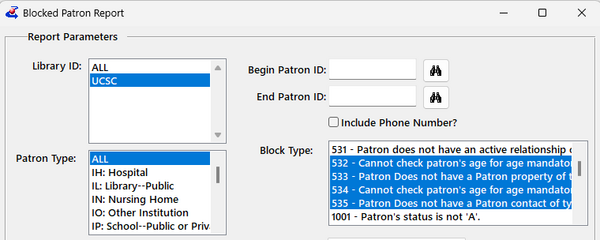
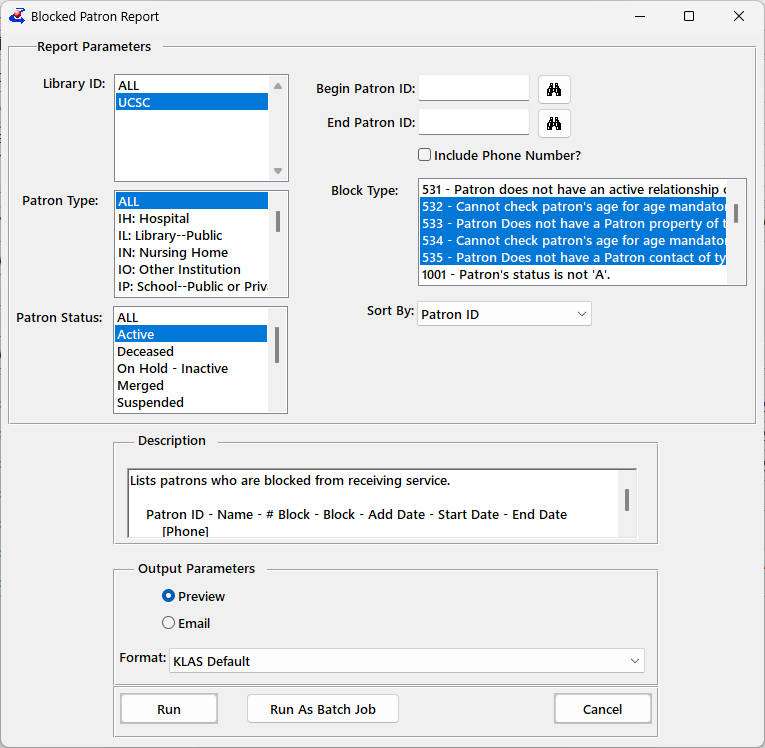
- From the Patron module, select Reports - Activity - Blocked Patron Report
- Select one or all of the Acknowledgement-related Block Types: 532 - 535
- To get the current results now, use the Run button
OR, To automatically get the report on a routine basis, set the Output Parameter to Email, enter your address, and select Run As Batch Job.
Set the Frequency to Weekly, check the day or days on which you want the report, and enter the time to run the report in 24-hour format (for example, 1pm would be 13:00).
Records with any of these Blocks should be either corrected or Suspended immediately. If you find you cannot correct a record or have questions about it, please contact Customer Support with the patron’s name and ID.
We are seeing that many of the Active records not in compliance are cases where only part of the Acknowledgement is missing. For example, a patron may have a "Yes" answer but the Parent/Guardian Alt Contact is missing. There are different blocks for each part of the acknowledgement (Birth Date, Acknowledgement Answer Property, and Alt Contact), so patrons with only one of these Blocks are usually a quick fix!
- Andrea Ewing Callicutt
- Knowledge Base
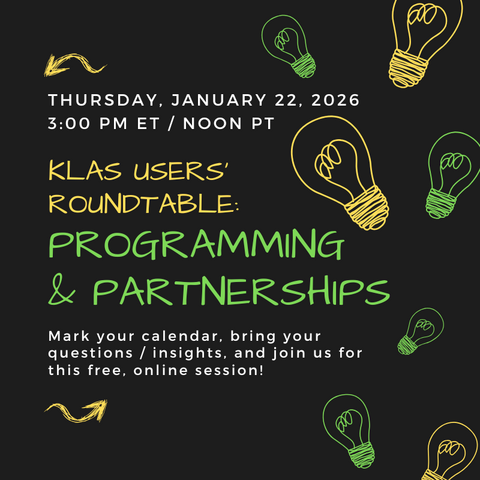
On Thursday, January 22, 2026 several Library for the Blind and Print Disabled network libraries shared about the programming they do to engage library patrons in-person or virtually. Engaging our patrons is an important way to retain them and keep patrons connected to the library and their fellow library users.
This session included a discussion of partnerships with public libraries, including Florida’s Ambassador Program and New Mexico’s Scribe Mini DOD systems in public libraries.
Panel Participants:
- Maureen Dorosinski, Florida Braille and Talking Book Libraries
- Jennifer McGill, New Mexico Library for the Blind and Print Disabled
- Ann Minner, Texas State Library and Archives Commission, Talking Book Program
- Abby Chumin, Indiana State Library, Talking Book and Braille Library
- Moderator: Josh Easter, South Dakota, KLAS Users’ President
Panelist Presentations & Resources
- Maureen Dorosinski's Presentation & Resources
- Google Drive Folder with all below files.
- Ambassador_Program_inquiry_letter_text.docx
- Ambassador_Slides-Suwannee_River_Regional_Library_System.pptx
- BARD_Demo_Books.docx
- Email_Example_FL_Ambassador_intro.pdf
- Instructions_for_waking_up_and_demo-ing_the_ereader.docx
- Patron_Referral_Code_Query.docx
- Publicity_List_for_Ambassadors.docx
- braille_ABC_cards_Avery_label_5160.pdf
- fun_with_braille_Avery_label_5161.pdf
- referral_on_app_-_return_envelope.pdf
- Jennifer Finley-McGill's Resources
- Abby Chumin's Presentation & Resources
- George Martell's Scribe Micro Presentation
- Jennifer Finley-McGill's Resources
Session Recording & Chat
Chat Transcript: 012252026_Programming__Partnerships_Chat.txt
- Katy Patrick
- Knowledge Base
As NLS makes sure that the "I"s are dotted and the "T"s are crossed on all the open collection acknowledgements, here's a run-down of all the required fields:
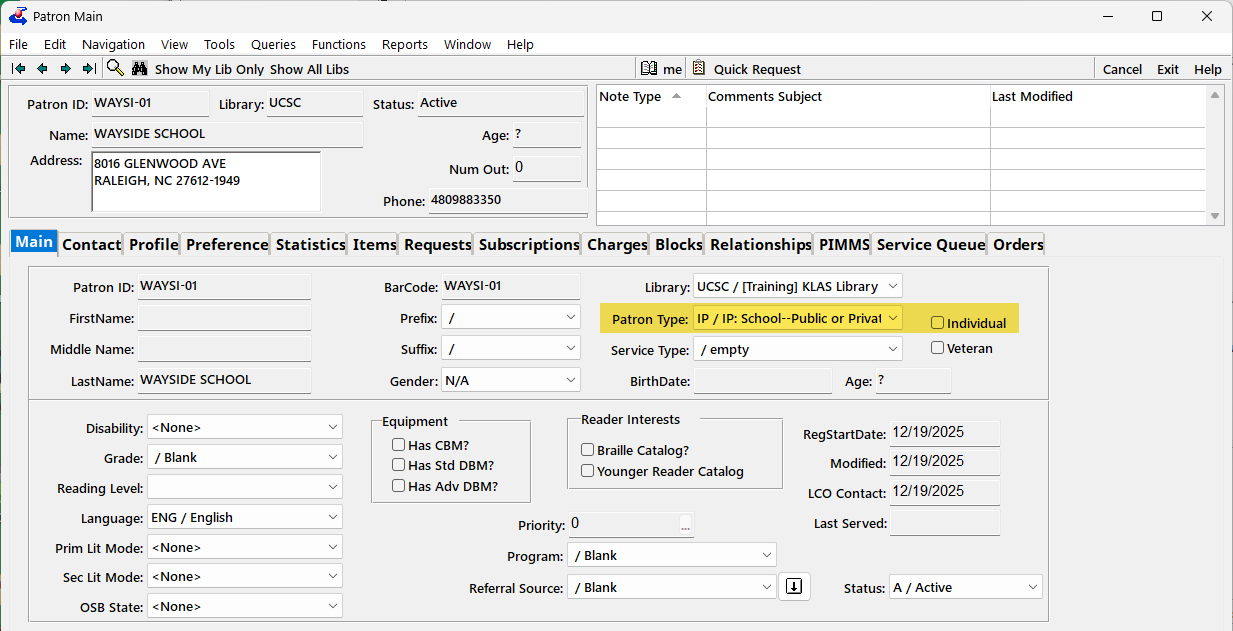
1. Patron Main
On the Main tab, the relevant Patron Types are:
- IP or IS for Institutions (make sure that Individual checkbox is blank)
- For juveniles, any patron type that begins with P will be checked for for the age (make sure that Individual checkbox is marked)
2. Contact tab
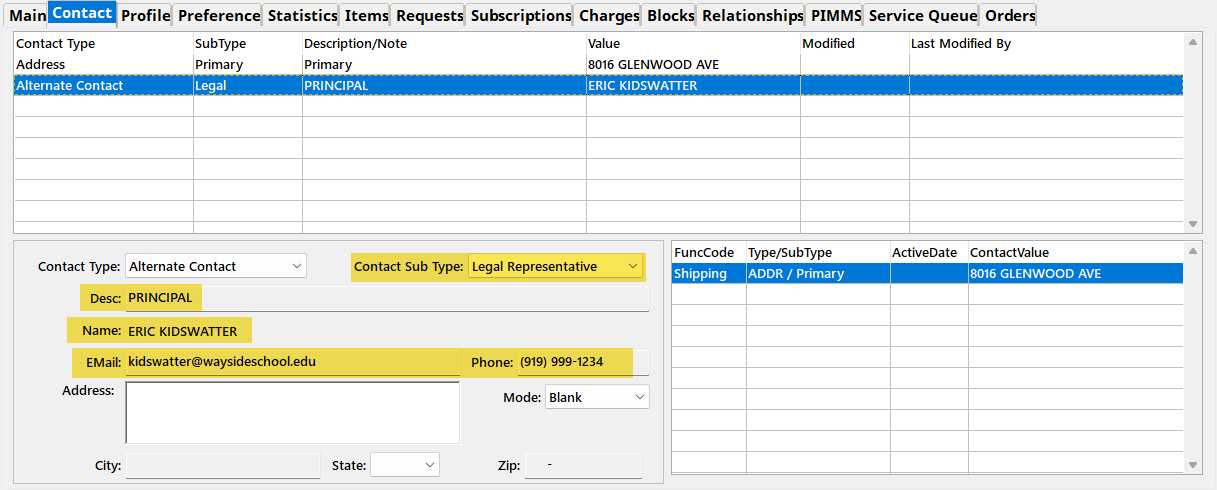
On the Contact tab, make sure the Alt Contact is present and complete:
- Legal for Institutions
- Parent or Guardian for juveniles
- Title in Description field for Institutions
- Full Name for either
- Phone and email for Institutions (corrected 2/17/26. Phone and email are optional for juveniles.)
2b. Contact Preference
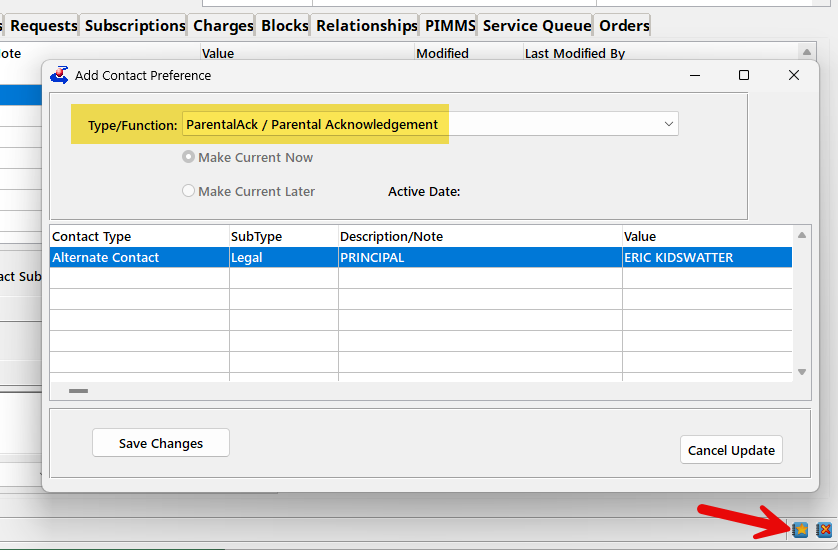
If there is more than one Alt Contact of a relevant SubType (such as two Parents on a juvenile's account), you need to specify which one to sync to NLS as having provided the Acknowledgement Answer.
Do this by setting a Contact Preference for the ParentalAck.
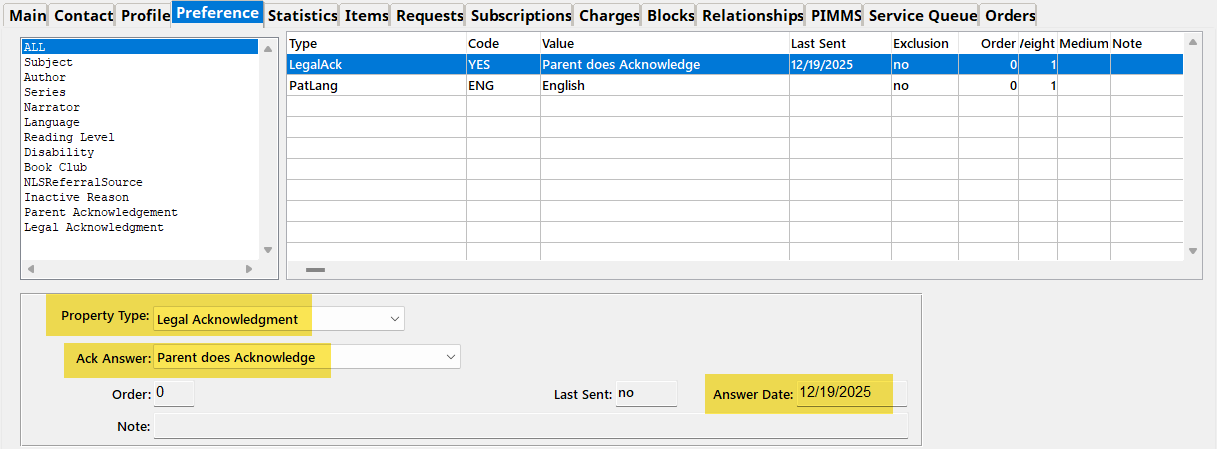
Finally, you need the Property record (aka Preference) recording the Answer and the Answer Date.
- For Institutions, the Property Type is Legal Acknowledgement
- For Juveniles, the Property Type is Parental Acknowledgement
- Either way, the answers are likely worded as "Parent Does Acknowledge" etc.
- Include the Date Answered
Questions & PIMMS Error Report
If you aren't sure why an account is included in NLS' list of non-compliant records and/or in your PIMMS Error Report, please check each of the above fields, and let customer support know the Patron ID if you still need help! If the record was in your Error Report, please include the text of the error as well.
- Andrea Ewing Callicutt
- Knowledge Base
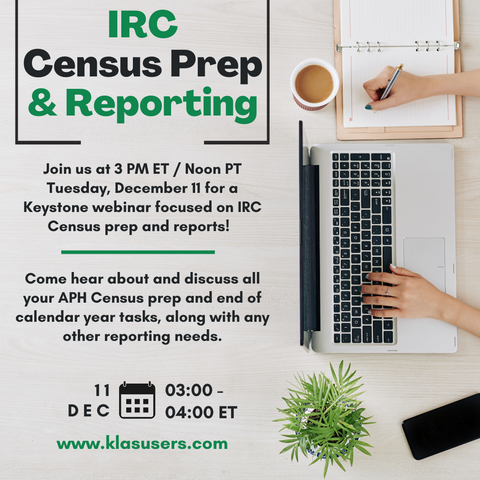
On Thursday, December 11, 2025 Marion and Katy presented a free, online KLAS IRC-focused webinar. During this session, they discussed and demonstrated KLAS functions that can help you prepare for and complete the 2025 APH Census as well as other reporting tools.
As we approach the end of the calendar year, do you know who was included in your last APH Census? Who is in your database but wasn't in the Census? Is your WebOrder Census section set up correctly to give errors and information that is useful to teachers? Do you have an up-to-date Help page with the FAQs and downloads you want to provide?
Hear about and learn all those end-of-year tasks, and any other reporting needs.
Resources mentioned:
Recording:
- Katy Patrick
- Knowledge Base
The workflow you use to add new Copies and Items to inventory depends on whether they are Copy-Specific or Non-Copy-Specific.
Add Local Titles
If the new inventory is for a new Title, follow this guide to add a new, non-NLS monograph to your catalog.
Please log in to download content. Thank you!Copy-Specific
When Items come with a suitable barcode already in place, or if you apply barcodes from a pre-printed label sheet, the Items then need to be received into KLAS individually so that KLAS knows which barcodes belong to the Title.
Using copy-specific barcodes on each Item allows you to track each specific Item’s status and history separately from any other copies of the same Title.
Please log in to download content. Thank you!Non-Copy-Specific
When Items come without a suitable barcode already in place, or if you do not use unique barcodes on your Items (non-copy-specific), the Items can be received into KLAS using the Batch Add Items function.
Please log in to download content. Thank you!Need more information about catalog inventory, such as the difference between a Copy and an Item, or how to add Consumable inventory? Please see Catalog Inventory.
- Katy Patrick
- Knowledge Base
The Lines by Patron Role Report returns all of the Material Request lines that meet a flexible set of criteria for a given time frame, grouped by Patron Role. This report replaces the Students Served report previously run by Customer Support.
The document below includes instructions followed by examples:
Use the Reference Worksheet to record which parameters you use for easy reference the next time you run the report:
- Andrea Ewing Callicutt
- Knowledge Base
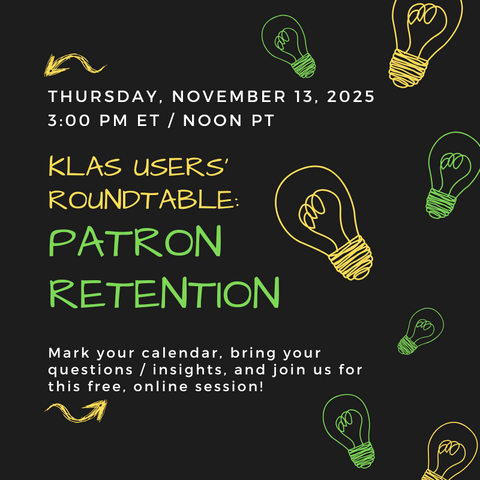
On Thursday, November 13, 2025 we hosted a KLAS LBPD Users' Roundtable session focused on Patron Retention moderated by Josh Easter, KLAS Users' Group President.
Session Description:
Our libraries exist to enrich the lives of people with standard print reading disabilities. How do we keep patrons active and coming back? How can we keep people connected and passionate about reading, using our services, and attending our programs? What strategies are other libraries trying? Join the discussion! We have several people on the panel, but it will also be an open floor for discussions.
Panel Participants:
- Lorrie Spoering, Colorado
- Michelle Roossien, Michigan
- Miranda Loper, Mississippi
- JD Burns, Mississippi
- Mary Beth Parks, Pennsylvania
- Moderator: Josh Easter, South Dakota, KLAS Users’ President
Resources shared by JD Burns, Mississippi:
- Borrower's Handbook
- FAQ
- Bard Mobile Video
- Bard Express Video
11/13/2025 Patron Retention Roundtable Chat Transcript - 2025-11-13_Patron_Retention_Roundtable_Chat.txt
11/13/2025 Patron Retention Roundtable Recording
- Andrea Ewing Callicutt
- Knowledge Base
Katy and Katharina hosted a KLAS Users' Group Meeting at the 2025 Midlands-Southern Conference for Talking Book Libraries on Tuesday, September 16 to share updates about Keystone and KLAS, future development, allow attendees to ask questions and provide feedback to Keystone staff as well as connect with other LBPD KLAS users.
Below you will find the Presentation we shared as well as the Recording of this session:
- Andrea Ewing Callicutt
- Knowledge Base
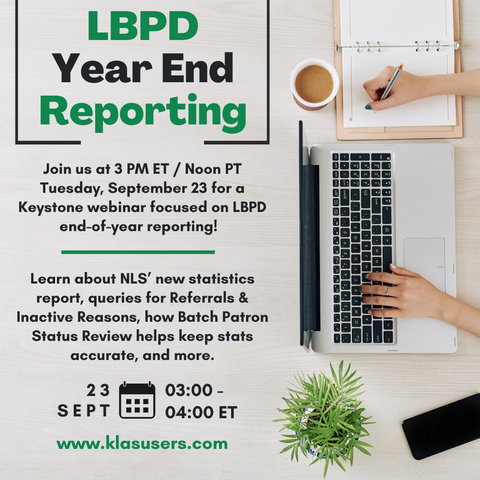
During this session for Library for the Blind and Print Disabled KLAS Users, Katy shared information about your end-of-year reporting process, including updates to Mitake's "Circulation Summary" spreadsheets, the new report for NLS's officially requested statistics, queries for Referral Source and Inactive Reasons, and a brief look at Batch Patron Status Review (BPSR) and how it helps keep your database clean and your statistics accurate.
Slides:
- EOY Reporting 2025 (PPT)
- Note: these slides have been updated to include (tested and verified) example queries. I believe the queries that did not work during the session were due to an error on the Basic Tab.
Recording:
- Andrea Ewing Callicutt
- Knowledge Base
James, Katy, and I hosted a KLAS Users' Group Meeting at the 2025 Northern-Western Conference for Talking Book Libraries. on Tuesday, August 5 to share updates about Keystone and KLAS, future development, allow attendees to ask questions and provide feedback to Keystone staff as well as connect with other LBPD KLAS users.
Below you will find the Presentation we shared as well as the Recording of this session:
- Andrea Ewing Callicutt
- Knowledge Base
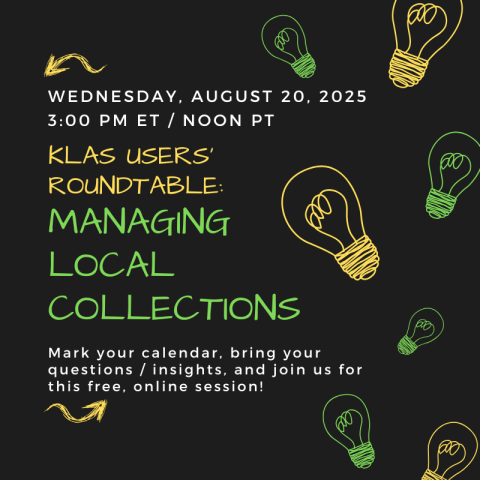
Join us for an engaging panel discussion on the intricacies of managing local collections. The panelists will discuss the types of local collections held by their libraries, the frequency and significance of their usage within the community, and the lifecycle of managing these collections—from selecting new items to daily management and weeding practices. There will also be time for a Q&A session with the audience.
- What: KLAS Users' Roundtable: Managing Local Collections
- When: 3 PM Eastern / Noon Pacific, Wednesday, August 20
- Where; Zoom!
- Meeting Link https://us02web.zoom.us/j/85715838990?pwd=9q4KtHjR8c8FWxkcYwYm7hTPc9aX4V.1
- Meeting ID: 857 1583 8990
- Passcode: 541822
- Join Instructions: https://us02web.zoom.us/meetings/85715838990/invitations?signature=NAaAmF99s3b_7BId0uqKO-s3Fhp1Q02IO9S3LFJ4Hj4
- Meeting Link https://us02web.zoom.us/j/85715838990?pwd=9q4KtHjR8c8FWxkcYwYm7hTPc9aX4V.1
Add this session to your calendar: