

Catalog
-
1/25/2022 Cataloging for Duplication Webinar
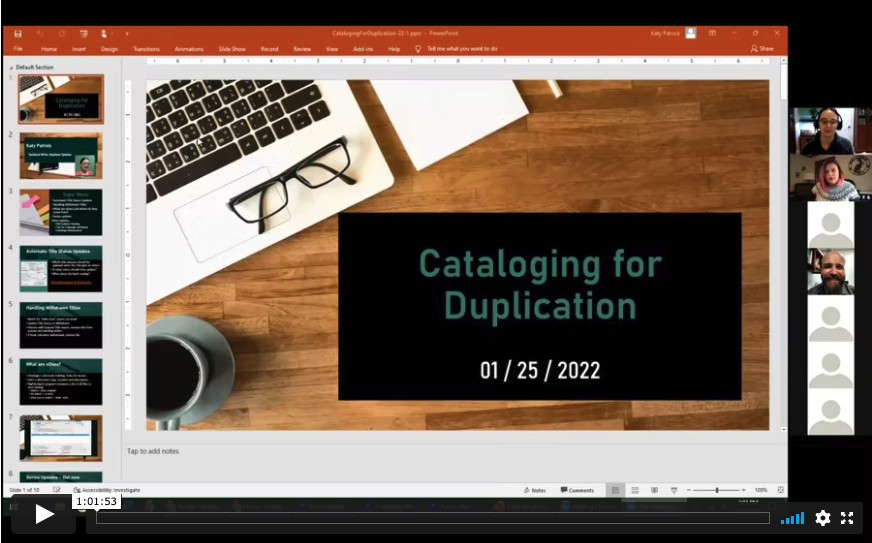
On Tuesday, January 25 at 2 PM Eastern / 11 AM Pacific we hosted a webinar discussing "Cataloging for Duplication" . During this online training, Katy addresses topics such as including handling withdrawn titles, updating new title records without physical copies coming in, and what eDocs are and where they come from. Below is the recording of the webinar. Run time is 1:01:53.
-
4/30/2026 KLAS Users' Roundtable: IRC / IMC Catalog Spring Cleaning
What's on your Spring Cleaning to-do list? Pepper Watson, Oklahoma Accessible Instructional Materials Center, and Marion Campbell, Keystone Systems shared Catalog clean-up items ideal for the months ahead, such as taking inventory, updating WebOrder, and withdrawing Discontinued items such as EBAE titles.
Hear about it all right here!
Referenced resources:
- Withdraw Inventory (locked to logged-in KLAS Admins only)
- Reconcile Inventory
-
7/9/2026 KLAS Users' Roundtable: TBT, Staff Picks, & Popular Subject Headings

Do you have special collections, such as Staff Picks, Local Interest, or Book Club lists, and if so, how do you promote them and make them available to your patrons? Are you promoting TBT titles or sending a local TBT replacement? On Thursday, July 9, a roundtable of KLAS users discussed how to manage and make use of these types of subject headings and special collections.
Lee Anne Hooley (Worcester Public Library, Talking Books Service), moderated this session, and Maureen Dorosinski (Florida Braille and Talking Book Library), James Gleason (Perkins Library), and Karen Wall (Worcester Public Library, Talking Books Service) presented.
Recording:
Resources & Downloads:
Florida's latest Selections from Talking Book Topics:
- Selections TBT July-August 2026 – Nonfiction
- Selections TBT July-August 2026 – Fiction
- More Selections from TBT available on the forum!
- NLS - Creating an Annotation
Karen's notes and reference sites:
- Reader’s Advisory Resources (in no particular order) - docx
- Reader’s Advisory Resources (in no particular order) - pdf
Katy's resources:
- MARC Record Corrections - 2026 (TBT and Sequel query sets)
- Change Headings by Query Set
-
8/06/2026 KLAS Catalog Q&A with Katharina Webinar
The Customer Support team is always happy to answer questions--but sometimes you just want to sit down with a KLAS expert and take a look at something. We asked users to bring all of their Catalog and MARC record questions for Katharina to answer during this informal webinar from August 6, 2026
Recording:
Resources:
-
8/20/2025 KLAS Users' Roundtable: Managing Local Collections
Join us for an engaging panel discussion on the intricacies of managing local collections. The panelists will discuss the types of local collections held by their libraries, the frequency and significance of their usage within the community, and the lifecycle of managing these collections—from selecting new items to daily management and weeding practices. There will also be time for a Q&A session with the audience.
- What: KLAS Users' Roundtable: Managing Local Collections
- When: 3 PM Eastern / Noon Pacific, Wednesday, August 20
- Where; Zoom!
- Meeting Link https://us02web.zoom.us/j/85715838990?pwd=9q4KtHjR8c8FWxkcYwYm7hTPc9aX4V.1
- Meeting ID: 857 1583 8990
- Passcode: 541822
- Join Instructions: https://us02web.zoom.us/meetings/85715838990/invitations?signature=NAaAmF99s3b_7BId0uqKO-s3Fhp1Q02IO9S3LFJ4Hj4
- Meeting Link https://us02web.zoom.us/j/85715838990?pwd=9q4KtHjR8c8FWxkcYwYm7hTPc9aX4V.1
Add this session to your calendar:
-
8/25/2022 KLAS LBPD Users' Roundtable Recording: Talking Book Topics
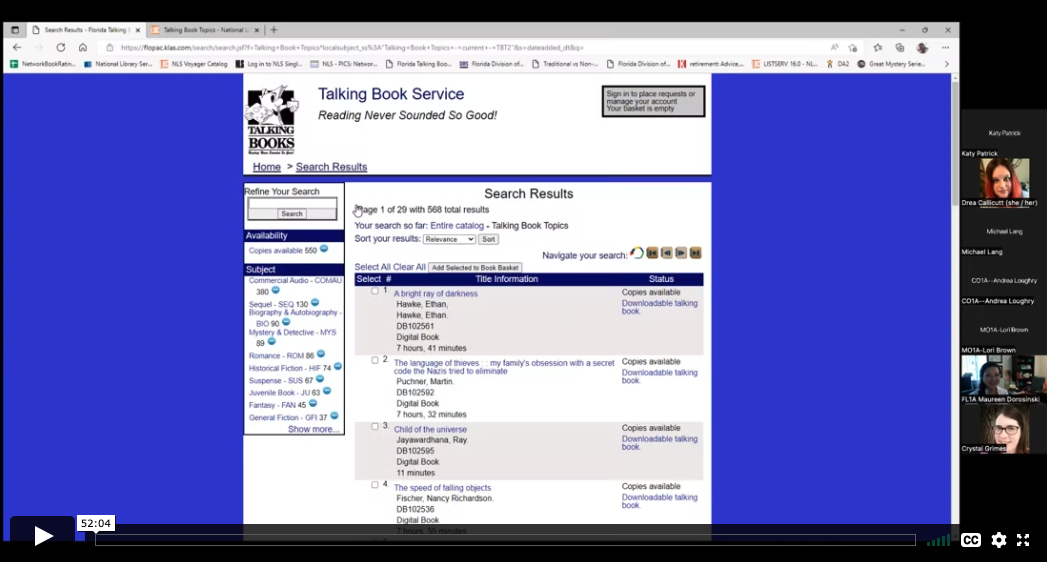
Below is the recording from our August 25, 2022 KLAS LBPD Users' Roundtable on Talking Book Topics.
Description: With the recent loss of the physical Large Print Talking Book Topics from our Reader Advisory Tool Box, libraries are crafting new strategies to keep readers informed about new titles being added to the collection. Our August roundtable explored how other libraries are addressing these changes and share your own successes in addressing the changes with TBT.
Host: Michael Lang, Kansas Talking Books Service
Panelists:
- Maureen Dorosinki, Florida Braille & Talking Book Libraries
- Crystal Grimes, Oregon Talking Book & Braille Library
Chat Transcript: 08-25-2022_KLAS_Roundtable_Chat.txt
-
Add a new WebOrder User
To ensure accurate tracking and reporting, users should never share accounts or give their account to a successor. Instead, new users should always get their own, unique WebOrder log in. This way, you will always know exactly who ordered and received material, even years later.
Overview
- Open the Patron Module in KLAS and Find or Add the new user’s record.
- From the Administration menu, open Security Control and navigate to Users.
- Add a record and fill in the new user’s information.
- Set the user login name to match their Patron ID.
- Set the User Category to MR Web Interface User (Web).
- Edit the user’s patron record to add the User ID.
- Use the Batch Manager to send the password creation email.
See the Download below for complete instructions.
Download
Please log in to view available downloads. Thank you!
Remember: You are always welcome to call or email Keystone Customer Support with questions!
-
Add Titles and Items
The workflow you use to add new Copies and Items to inventory depends on whether they are Copy-Specific or Non-Copy-Specific.
Add Local Titles
If the new inventory is for a new Title, follow this guide to add a new, non-NLS monograph to your catalog.
Please log in to download content. Thank you!
Copy-Specific
When Items come with a suitable barcode already in place, or if you apply barcodes from a pre-printed label sheet, the Items then need to be received into KLAS individually so that KLAS knows which barcodes belong to the Title.
Using copy-specific barcodes on each Item allows you to track each specific Item’s status and history separately from any other copies of the same Title.
Please log in to download content. Thank you!
Non-Copy-Specific
When Items come without a suitable barcode already in place, or if you do not use unique barcodes on your Items (non-copy-specific), the Items can be received into KLAS using the Batch Add Items function.
Please log in to download content. Thank you!
Need more information about catalog inventory, such as the difference between a Copy and an Item, or how to add Consumable inventory? Please see Catalog Inventory.
-
Are you Ready for Duplication? (And is your Catalog?)

Whether you’re chomping at the bit or dragging your feet, sooner or later Duplication on Demand service will be coming to all NLS network libraries. As we get deeper into implementation processes at more and more libraries, we want to make sure we’re sharing what we learn with the rest of you, to help things go as smoothly as possible.
A big thing that we hope you’re hearing is that the time to work on your cataloging is now.
As you switch your patrons to Duplication service, they will very suddenly have access to your entire catalog of DB titles. That includes:
- Almost a decade of Retrospective titles, which you may not have done any cataloging for since no copies were ordered or expected.
- Anything and everything from Copy Allotment that you requested only 1 copy of, because it wasn’t a subject your patrons had much interest in.
- All of those titles you returned all of your copies of through the XESS process.
This can and will be a huge benefit to your patrons, as they will be able to receive their requests and reserves faster than ever, read series in order, and have access to all the classics and old favorites they may have had trouble getting before.
It can also have its pitfalls, especially if your catalog hasn’t been kept up. But don’t panic! You still have time to fix things.
Take a look at your catalog, and come up with a plan. If you have questions or need help strategizing, we’re here to help!
Some things to check on or try out:
Is this subject set up in your catalog and applied to titles that you don’t want circulating except on request?
- No Local Subjects
Make sure your back catalog can circulate (or be excluded!) appropriately. Run a “PDQ – Missing MARC Tags” to find titles with few or no 690s.
- Missing Exclusion Subjects
The Merge Queries feature in version 7.7 enables you to query for information that isn’t on a record, and this is a good time to use it! Run a query for books with “Strong Language” in the annotation, and select any result to get the search into your “recent queries list. Then, run a query for books with your strong language subject code or codes (likely SL). Use merge queries to subtract the second search from the first, and you’ve got a handy list of books that need their exclusion added! (Then, you can do the same for violence and sexual content.)
This version 7.7 feature will help you apply exclusion headings from the Rating Unrated Books project, or add new Local Subjects to appropriate titles quickly and easily.
- Series Info
As you add new books to those long, sprawling series... take that as a reminder to do a book search for the series and see if those older titles are cataloged as part of the series, or if its missing some of its lower numbers. Also take a look at the Link Titles screen: titles listed there will count as HasHads for the listed title.
- High Demand Requests
The “HD Titles – Requests” report can help you find titles with many outstanding requests. The listed titles (especially those with a high requests-to-copies ratio) are likely to see a big spike in circulation; make sure the cataloging is good so they can keep going even to patrons who didn’t think to ask for them.
- Outdated Requests
Do your patrons remember what they requested 3 years ago? 10 years ago? Think about how far back you want to serve request lists, and let us know if you want to clear out some of those ancient requests.
-
Assign Items to a Shelf
This process allows you to associate un-barcoded Items in KLAS to a specific Shelf using Circulation Maintenance by KLAS ID. If desired, barcodes can then be generated for those items for use with the check-out and Circ Maintenance functions from the Shelve Items function.
To add new shelves or label stock, contact Customer Support.
Table of Contents
- Assign Items to a Shelf
- Print Labels by Shelf
Download
Last updated June 2026.
Please log in to download content. Thank you!
Do you use Circ Maintenance by KLAS ID? Share your tips in the comments--or let us know if you have questions!
-
Automatic Status Updates for Duplication-Ready Titles

We just released a new feature to help Duplication-on-Demand libraries keep their catalogs up to date!
From the 7.7.50 Release List:
You can now choose to have titles automatically updated to an Active status when you add an eDoc, just as you can have titles make themselves Active when you add the first physical item.
But let’s talk a little bit more about what this can do, and who will want to use it.
We expect this will be primarily for libraries using Duplication on Demand, and especially the ones who are (or will soon) be going collectionless. If you don’t have physical copies of anything or have very few physical copies, it only makes sense to make everything you can duplicate “Active.”
Even if you still have a physical collection, if most of your patrons are getting DoD will they be confused that some titles are listed as Active and some are Download Only? Once you zero out your copy allotment, do you want new titles to linger in “In Process” status long after you start duplicating them for patrons?
If any of the above has you thinking, “yes, I want to use this feature!” here’s what to think about...
- What title statuses should update when they get an eDoc?
- What status should they update to?
- What about the back catalog?
What title statuses should update when they get an eDoc?
Open up the catalog and look at the list of Title Statuses. Are there ones that shouldn’tbe over-written, like Withdrawn? If there are titles you purposefully removed from your collection (Ex: outdated medical information or obsolete guides to the internet) we don’t want to accidentally resurrect them.
If you have a Special Order Only or similar status, do you want to keep those titles segregated? Or if you’re duplicating at full steam, are you ready to fold the ones you can duplicate back into Active?
When you’re ready, send us the list of statuses that should be updated by this feature.
What status should they update to?
I mostly talked about the feature updating duplication-ready titles to Active, but that isn’t your only option. Any status other thanWithdrawn can be duplicated, so it won’t cause problems if you do want to keep these titles under a different status. You could do an “Active – Duplication” or “Active for Digital” title status. Or, you can put them under “Download Only” if you have that labeled clearly for your OPAC (something like “Available for Download or Books on Demand”). And, of course, if you’re changing things to Download Only, that shouldn’t also be in your list of statuses to be updated.
Figure out what makes the most sense for your collection and your patrons, and tell us what status titles getting their first eDoc should update to.You can also let us know if you want to set up a new title status or re-label any of the existing ones on your OPAC.
What about the back catalog?
Once you’ve set both your statuses to be updated and the status to update them to, those rules will automatically apply whenever a title gets its first eDoc. But what about any titles that already have an eDoc but are lingering in a no-longer-accurate status?
We have a program we can run through your batch manager to clean those up! We’ll want to run it sometime when you aren’t doing anything in the catalog module, to avoid any conflicting record locks. Most likely, we’ll run it overnight or early in the morning before you get to work.
Just bear in mind that it can be messy to try to undo this kind of thing, so do your best to be sure about the changes you are making before telling us to run the cleanup.
-
Bestsellers by Decades

This is a guest post by Maureen Dorosinski, Librarian / Production Supervisor, Florida Bureau of Braille and Talking Book Library Services.
The question:
Meagan from FL1M had a question: “Do we have exclusions for certain dates? Many of our patrons are auto select from their preferences, but only want books from a certain time period.”
Nancy at KLAS suggested we could set up subject codes based on dates. For example, instead of putting everything in the "Bestseller" category, a Bestsellers of the 1990s, Bestsellers of the 80s, category.
First Stop:
Nancy completed a process of setting up the bestseller codes for the various decades. She set the following in place, and filled them:
- BEF50 / BEN50 - fiction and nonfiction prior to 1970
- BEF70 / BEN70 - fiction and nonfiction from 1970 - 1979
- BEF80 / BEN80 - fiction and nonfiction from 1980 - 1989
- BEF90 / BEN90 - fiction and nonfiction from 1990 - 1999
- BEF00 / BEN00 - fiction and nonfiction from 2000 - 2009
In putting these codes on the titles, she also removed the generic BES, BEF and BEN codes, so what is remaining in those subject headings are the more recently published titles.
Second Stop:
Since NLS uses an amalgam of LA Times, New York Times, USA Today, and Washington Post bestseller lists to tag books, our cataloger Dina took things to the next level and further populated these tags from NLS by searching all the New York Times Bestsellers, and adding the appropriate subject headings to previously unnoted bestsellers.
To streamline the process, she went to Bookshare.org. They have a section of the top 10 fiction and non-fiction titles from the NYT list, these lists round up the titles without repeating them, and can be filtered by year and month.
Going Forward:
Nancy says the automatic codes being used are BES, BEF and BEN. When MARC records come in, those are updated. If, in your review, you see a recently added title that was originally published in 1970, you might want to add the 1970 bestseller code to it, but other than that, those should stay pretty static. And yes, remind the RAs that these categories exist, for either selection or exclusion.
Maybe another library could continue, Dina says we'll have to add subject headings for the 2010s and (eventually) the 2020s and assign them as appropriate. Maybe you will share their queries with us to import!
Get Bestsellers By Decades at Your Library:
I have attached the text queries with all the books we have tagged in each of the categories. To apply them in your catalog:
- Add the new subject codes as listed above to your catalog using Headings Maintenance.
- Import the first query file.
- Use the Change Headings - Query Set tool to apply the new heading to the Query Set and remove the old heading.
- Repeat for each of the query files.
I’m sure KLAS would help out if you need them!
Downloads:
Thank you!
Maureen in FL -
Cartridge Statistics
NLS is interested in tracking cartridge availability and use system-wide, and may be contacting you for some statistics.
Duplication Cartridge Use
The cartridge use statistics NLS is requesting are:
- Number of unique cartridges that have been put into circulation to date
- Number of cartridges currently checked out to patrons
- Number of cartridges marked lost
The easiest way to retrieve those numbers in KLAS is to check the catalog records for your cartridges: DB-CART, BR-CART (if duplicating braille), and any other duplication media, such as DS-CART.
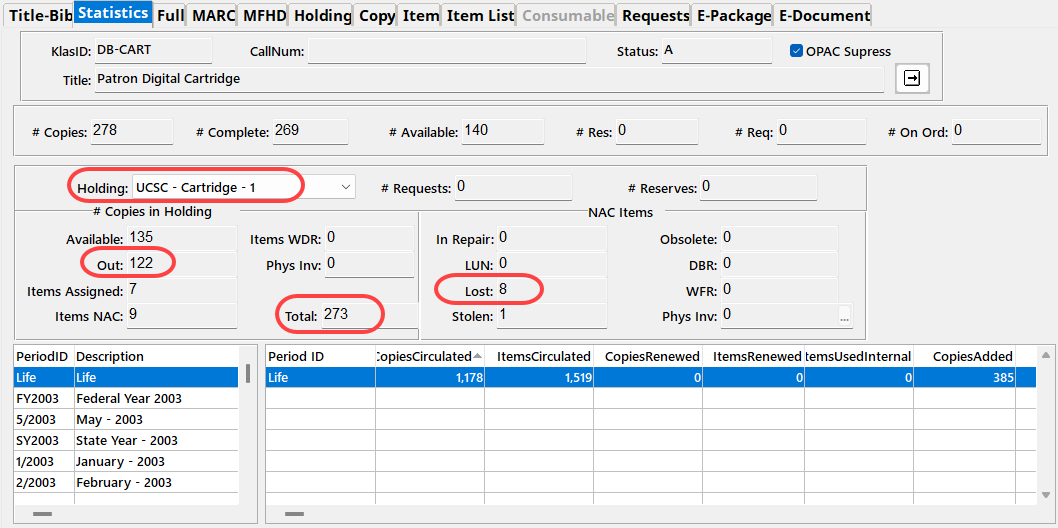
For each cartridge record, check the Statistics tab, and set the Holding to your branch.
- "Unique cartridges that have been put into circulation to date" is your combined Total cartridge counts.
- "Cartridges currently checked out to patrons" is your combined Out cartridge counts.
- "Cartridges marked lost" is the combined NAC - Lost count.
Single-Title Cartridge Inventory
To get the current number of pre-recorded, one-title per cartridge items still in your system, you will need to run the Holding Summary Report twice.
- In the Catalog module, select Reports - Holding Summary.
- Select your Library ID, set Rec Type to Monograph, and Run the report.
- Note the #Items Available for DB.
- Add Begin KLAS ID: DB-CARTand End KLAS ID: DB-CART, and Run the report again.
- Subtract the Available DB-CART count from the total Available Monograph count to get the number of available cartridges in your system (that are not DB-CARTs).
If you need assistance or have questions about any of these statistics, please let us know!
-
Catalog Inventory
Items, Copies, and Consumables (oh my!)
Do you know the difference between the Item Tab and the Item List Tab, between Tracked and Consumables titles, and between a Copy and an Item? Do you know how to use Batch Add Items for tracked titles and consumables?
If you maintain physical, non copy-specific inventory at your library (that is, inventory where all copies are interchangeable), this reference is for you!
Contents
- Tab Overview
- Tracked vs Consumable
- Copy vs Item: What is the difference?
- Add a Holding
- Batch Add Items - Tracked titles
- Consumables Inventory
Download
Please log in to view available downloads. Thank you!
Remember: You are always welcome to call or email Keystone Customer Support with questions!
-
Change Headings by Query Set
The Change Headings – Query Set tool allows you to add and / or remove Subject headings from a set of titles all at once. You can create this set either using the Query tool or from a list of titles; for example, if another library shares their list of “Amish Romances” or “Cozy Fantasy” with you, or when using the spreadsheet of RUB Project volunteer ratings.
Process overview
- Enter or Import a Query Set. This set should be under 4,000 titles maximum.
- Open Change Headings – Query Set and review the loaded Search Results.
- On the Add/Remove Headings tab, add a line for each of the change for this batch of titles.
- Use the Apply Headings Changes button; the listed change(s) will be made for all titles.
Download
Last updated May 2026.
Please log in to download content. Thank you!Resources
For more information about applying the Rated Unrated Books (RUB) volunteer ratings, see:
For ready-to-import query sets of the recent Talking Book Topics titles and / or Sequel titles, see:
How do you use Change Headings by Query Set? Share your tips in the comments--or let us know if you have questions!
-
Getting Serious about Series
With KLAS release 7.7.65 in the final stages of testing before going out to Early Release, let’s take a look at the series improvements we’ve been working on.
Service Order Preference
When you add or update a Series Preference after getting this update, you’ll have a new field: Service Order.
This defaults to Sequence, which will send series book out according to the cataloged Sequence as KLAS has always done it, plus all the new updates below. However, you will also have the option of switching the preference to PubDate—allowing the patron to receive the series in order by Publication Date!

Some series (especially some of those long-running science fiction and fantasy series) have a contested read order. We hope this option will allow your patrons more flexibility in how they receive their series, without adding extra work for your cataloger.
Multiple Ordered Series
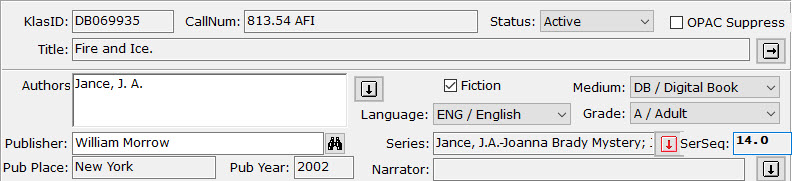
While the Title-Bib page in the KLAS Catalog module always allowed multiple Series to be selected, it only supported one Series Sequence. With this update, however, you will finally be able to apply a unique Series Sequence to every Series on a title!
Since the Series field is only long enough to display one series at a time, the Heading Select button will be flagged red as a heads-up if multiple series are selected. Screen reader users will be able to hear all applied series listed in the field, as they don’t have to contend with the limited display area. The Series will be listed in order from the lowest sequence to the highest.
The SerSeq field will display only the lowest sequence for that title. All of the sequences can be viewed series by series on the Select Headings screen.
Once a Series Sequence is set for each series a title is part of, any of those series will send that title in the correct order. If a patron has a preference for both series attached to a title, they will get the title from both series, as long as it is not currently a HasNow (including being already in the Service Queue or in a pending Duplication Order). This will allow the patron to read the book again in context of the second series, or safely skip it the first time it's received if they want to avoid spoilers for the other series, knowing they’ll get it again when they catch up in the other series. If they still have the title from the first series, the second series simply skips it and continues with the next title in their preferred service order.
Multiple Sequences for one Series
In addition to being able to set a unique sequence for each series, you can also enter a list of sequences for one series. This allows KLAS to intelligently handle compilation titles, where NLS included multiple books on one cartridge / in one recording.
For a title with books 1-3, you can tell KLAS the title includes sequences 1,2,3. If the patron already had book 1, and books 2 and 3 are also available as single-book titles, KLAS will send the singles instead of repeating book 1. If any sequence is only available in the compilation, KLAS sends the compilation instead of any single-book titles, even if a patron already had one or more books on the compilation. And if all titles are available both ways, and the patron hasn’t had anything on the compilation yet, KLAS will send whichever ‘set’ of books is newest,as determined by the Pub Date, with the date added to the catalog as a tie-breaker.
In short: KLAS will send every book in the series, as identified by SerSeq, with as few duplications as possible. When it has an otherwise equal choice, it will aim for a newer recording.
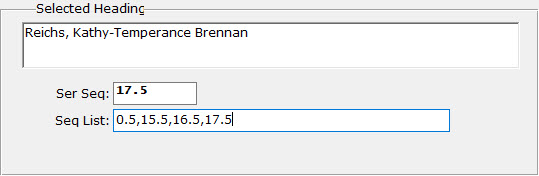
You can also have compilations with a sequence list with gaps in it, usually for a collection of novellas that go in-between various "main" series books. The SerSeq, used to determine where in sequence a title should be sent, is still controlled separately from the list. This allows you to control whether this type of collection should be sent as the first sequence (0.5 in the above example, allowing the patron to read the prequel before book 1), the last sequence (17.5 in the example, ensuring the patron won’t get any spoilers for books they haven’t gotten to yet), or after all other titles in the series (SerSeq 99 will usually be safe).
Of course, for patrons with a “PubDate” service order for their Series preference, the SerSeq will be ignored in favor of the Pub Date; however, the Seq List can be used to identify unique vs duplicate series books (as in, has the patron already had some of the books in this compilation? Are all of them available another way?).
Some nitty-gritty extra detail:The SerSeq must be included in the list (so if forcing the above example to the end of the series, the list would become 0.5,2.5,9.5,13.5,99.0). Remember these sequences are used to identify duplicate books in the series, so if you have a stand-alone 13.5 and a compilation 13.5, KLAS will try to only send one version. However, if you have two such compilations, with at least one SerSeq in each list only available in that compilation, they will both be sent even if they were both seq 99, to ensure all unique sequences are sent.
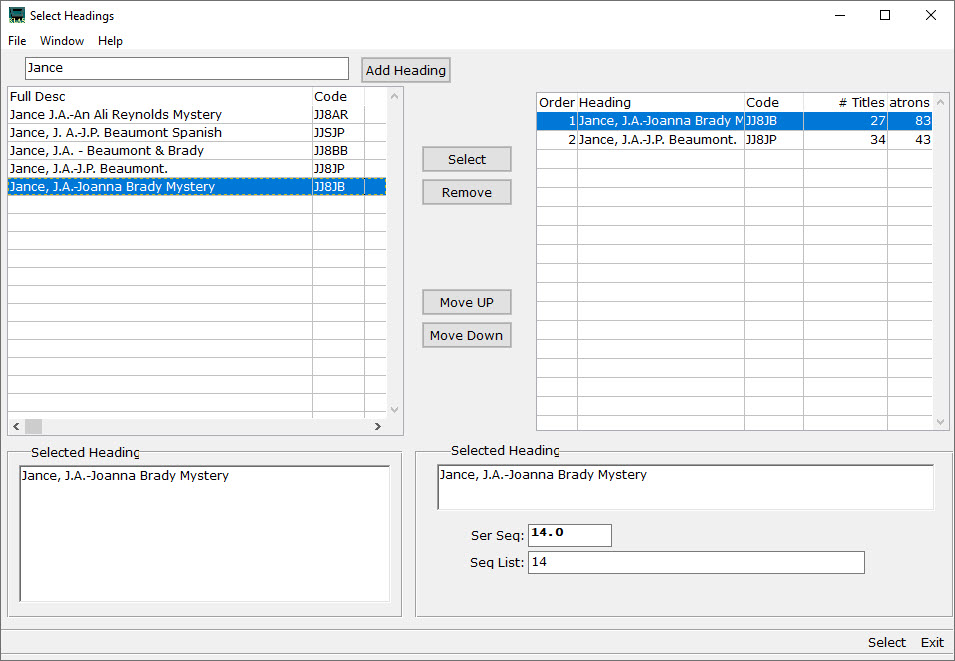
Select Headings
Both the SerSeq and Sequence List are set on the Select Headings screen, which has also gotten a couple “bonus” upgrades while we were adding the new fields.
The change list includes:
- Search field is now a “matches” filter, not a “begins” search
- Number of associated Titles and Patrons now included in both halves of the screen
- “Relator” field added for Author and Narrator headings
- SerSeq and Sequence List fields added for Series headings
This means that, instead of typing in letters to skip to the part of the list that begins with those letters, you can now filter the left-hand list using a “matches” search against any part of the series. Not sure whch author a multi-authored series is listed under? No problem—just type in one or more words from the series description, and hit Tab to see only the results.
The search will include the author, series description, and fuller form fields. So, if an alternate series title is entered in the main heading’s MARC data as a fuller form, you can then filter for the series using either title. If a heading has a fuller form, it will display along with the full description in the “Selected Heading” field in both column’s detail viewer.
Note: the search words will be treated as a complete string, not keywords. “Wild West” will match “Wild, Wild West,” and “Untamed Wild West,” but not “Wild, Wooly West” or “West, Wild and Wilder.”
To return to the full list, delete everything from the search field and press Tab again.
Finally, about those “relator” terms: in brief, those allow for accurate MARC tags for Editors, Translators, and the like. They can be set for any selected Author or Narrator heading in the same part of the Select Headings screen where SerSeq and Sequence List are set for series. If more information on Relators is needed and wanted—let me know and I’ll get it out to you!
Next Steps
This is all wonderful, of course (or so we hope), but we know updating the whole back-catalog can be a daunting task. How do you go about getting all of this set up for all of the series in the collection?
We’d love to do it all automatically... unfortunately, that isn’t feasible with the variety of approaches libraries have taken to their series cataloging, and the need to preserve any other cataloging changes made to titles vs their original MARC data from NLS.
We have, however, done our best to make sure as much data as possible can be brought in from newly-imported MARC data, and to make sure series MARC data exports as well as possible from KLAS. To take advantage of this, you may need your Filter set-up adjusted.
Your best bet will be (once you get the update to use Headings Maintenance to sort your series by # Patrons. That will identify your most popular series, and those will be the ones most worth reviewing to correct/update the series information on each title.
Then, when you next import MARC records take a look at how the series data comes in, and contact us to discuss any changes that are needed to your filters to ensure you get as much automatically as possible.
Conclusion
This is a big, complicated update on every front: the work needed to make it happen, the patron service implications, and even the task of explaining all of those implications. We’ve done our best to ensure that these changes result in better service, with the least work needed on your part, with as much room for flexibility and control as possible.
Big, big thanks to the KLAS Development Advisory Committee (KDAC) for help steering these changes and informing service decisions (such as when to send a compilation vs the same set as single-title recordings), and to Brian White, who did the bulk of the actual programming as his final project for Keystone.
We will continue to work with you to ease the cataloging transition, and to answer questions either now or as they arise.
We hope this update is a big improvement for you and your patrons!
-
Headings Maintenance
Headings are used to ensure that author, narrator, series and subject entries are consistent from one bibliographic record to the next. Heading Maintenance allows you to add, merge and delete heading authority records.
Note: This function is intended for catalogers and KLAS admins. If you are not sure whether you have the authority to make these types of changes for your library, please clarify with a supervisor before making any changes in Headings Maintenance.
This document includes instructions on:
- Finding Heading Maintenance
- Adding a new Author or Narrator Heading
- Adding a new Series or Subject Heading
- Modify a Heading
- Merge Headings
- Delete Headings
- Adding MARC Data
- Dewey Decimal Mapping
Download:
Please log in to download content. Thank you!Resources:
For instructions on adding or removing a Subject Heading from a batch of titles, see:
How do you use Headings Maintenance? Share your tips in the comments--or let us know if you have questions!
-
Intro to KLAS for IRC
New to KLAS, stepping out of your comfort zone into a different module, or just wanting a review of the basics? Check out the Intro to KLAS manual for an overview of all the main KLAS screens and some of its primary functions.
Last updated July 2026
Please log in to view available downloads. Thank you!
Note: This manual was originally designed for print, and the images are not described. If you use Assistive Technology or otherwise cannot benefit from undescribed screenshots, please see the AT Reference Document for contextual information and text-only screen contents.
-
Intro to KLAS for LBPD
New to KLAS, stepping out of your comfort zone into a different module, or just wanting a review of the basics? Check out the Intro to KLAS manual for an overview of all the main KLAS screens and some of its primary functions.
Last updated July 2026.
Please log in to view available downloads. Thank you!
Note: This manual was originally designed for print, and the images are not described. If you use Assistive Technology or otherwise cannot benefit from undescribed screenshots, please see the AT Reference Document for contextual information and text-only screen contents.
-
KLAS UC2025: Cleaning up the Catalog

By popular demand, the 2025 KLAS Users' Conference breakout session "Cleaning up the Catalog" by Meghan McCormack is now available!
What problems have you seen running through your catalog? Do you have books missing exclusion codes or containing incorrect exclusions, or have you seen books with incorrect grade codes and a length of 0 minutes? These can be found and fixed. Find out what queries to use to find these errors and how quickly or not so quickly they can be fixed.
Presenter: Meghan McCormack, Reader Advisor and Technical Lead, Wolfner Library
Slide Deck:
KLAS UC2025 - McCormac - Cleaning up the Catalog (pptx)
Recording:
If you have any tips, tricks, or resources to add, please chime in using the comments section below. And if this sessions was helpful to you, consider joining us at KLAS UC 2027, or even better, joining a committee or submitting a session proposal to help make it happen!
